Home  Order  Download  Screenshot  FAQ  Links  Dealers  WhatYouSay  

 
RiyazStudio screenshot - how does it work?
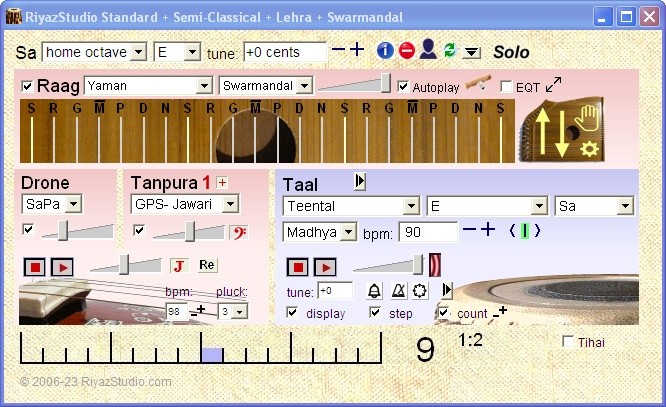
Hold the mouse over the controls of the latest RiyazStudio screen shot to see what they do:

Expand / contract / adjust taal display Display position in cycle. Click on display to adjust where cycle starts to play Adjust fine tuning of this tabla sample - in case you feel it's not quite in tune with the drone Stop or play the tabla and adjust its volume Stop or play the drone and tanpura and adjust joint volume Use style of faster cycle (usually less detail) without changing speed. Click again for more effect Back to default style Use style of slower cycle (usually more detail) without changing speed. Click again for more effect Slow down or speed up: click for step change, hold for gradual change. Hold down Ctrl key to keep same tabla sample Tabla speed in beats per minute Rough speed of tabla: vilambit (slow), Madhya (medium), Drut (fast), Ati Drut (very fast) Switch the tanpura on or off and adjust its volume Switch the drone on or off and adjust its volume Select another tabla sample group Semitones sharpened (+) or flattened (-) to reach this pitch from original recording pitch of this tabla sample group Natural beats per minute range of this tabla sample group Original pitch that this tabla sample group was recorded at Relative tabla pitch to current drone: Sa, Pa or Ma - of this tabla sample group Select tala: Teental, Ektal, Rupaktal, Jhaptal, Addhatal, Keherwa, Dadra, Deepchandi and Jhoomra Select notes of tampura: SaPa SaMa, plus special tunings for ragas Pooriya, Gujari Todi and Marwa Select notes of continuous drone: Sa, SaPa or SaMa Adjust fine tuning of drone, tampura and tabla to exactly match your instrument Select pitch of drone, tampura and tabla to match your instrument or voice

You can also control RiyazStudio through your computer keyboard:

 Key Effect
 D       starts / stops drone and tanpura
 A   S       lowers / raises drone and tanpura volume
 Space bar       starts / stops tabla
 Z   X       lowers / raises tabla volume
 B change tabla speed: press "B" 3 or more times at the new speed
  switch to style of slower (more detailed) / faster (less detailed) cycle 
  slow down / speed up
 Ctrl hold down to keep the same tabla sample as you change speed
 -   +       lowers / raises fine tuning

RiyazStudio remembers your settings from one session to the next.



Copyright © 2006-2007 RiyazStudio