Select your tanpura sequence
-
In Raag mode, RiyazStudio displays just those tanpura options that fit with the chosen raag.
The last setting you choose for a raag is remembered and reapplied the next time you switch to that raag.
-
The first up to 8 preset note combinations (Sa, SaPa, SaMa ... Sare) choose the note that starts the tanpura sequence (followed by Sa in high and low octaves).
Sa is the tonic; Pa perfect 5th; Ma perfect 4th; Ni 7th; ni flat 7th; Da 6th; da flat 6th; re flat 2nd
-
The next 4 are rhythmic options - if Pa were the first note chosen then:
rhythA plays: Pa - Sa Sa Sa -
rhythB plays: Pa Sa Sa Sa - -
If, while 'recording' a tanpura sequence, you get 'lost', you can select one of these settings to reset the tanpura to something familiar.
-
Next come a couple of options of two notes followed by Sa that fit the raag.
-
Lastly, 'tanpura user settings' reapply particular tanpura settings and sequences that you've
used and saved in the past (or that came supplied with RiyazStudio).
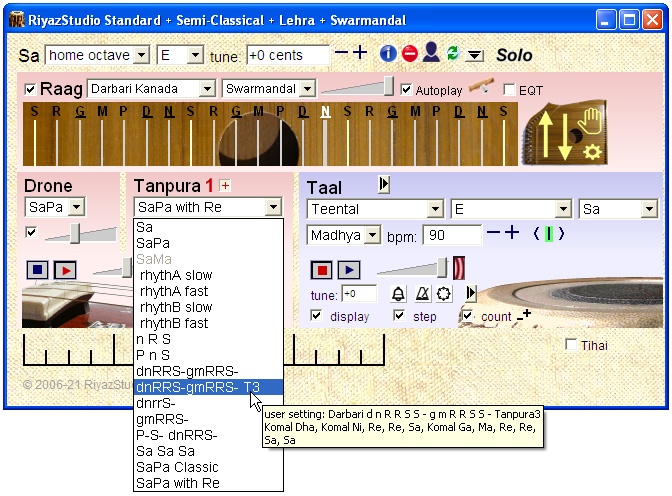
You can play and record your own tanpura sequences using the number keys (of the standard PC keyboard):
-
Play your sequence (1=Sa ... 5=Pa ... 7=Ni ... 8=high Sa ... 9=high Re, holding Ctrl for komal or tivra notes) then hit
Enter to make RiyazStudio repeat it (or Backspace to start again).
-
RiyazStudio remembers not just the notes you played, but also their tempo and rhythm.
-
If the notes you play match one of our preset patterns, RiyazStudio will use your new rhythm for all preset patterns.
-
If the notes you play don't match a preset pattern, RiyazStudio sets up a temporary 'User' Tanpura entry for it.
You can save your new tanpura sequences (and other tanpura settings) to use in the future with the User Setting controls at the top RiyazStudio window (if this isn't visible click the top-right 'show user setting controls' button):
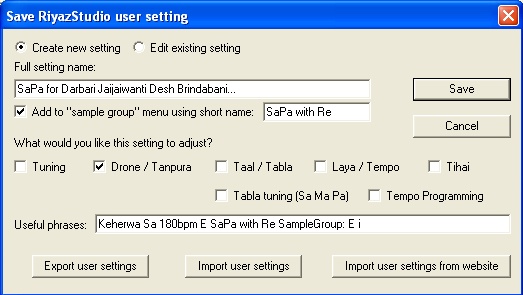
If you're a user who's created and saved your own tanpura user settings using previous versions, you'll notice we've hidden them - with the introduction of the Raag mode and Swarmandal - to avoid the tanpura dropdown menu being overloaded with user settings named after raags.
You can show them again by selecting the "Load old tanpura settings" control (in the Swarmandal settings); then for each setting that you want to use,
click the Save button (in the user setting controls) then select "Edit existing setting" and click "Save".
Those settings should then appear (when relevant in Raag mode, and all the time outside Raag mode).